> ## Documentation Index
> Fetch the complete documentation index at: https://docs-dev-fix-docs-5546-update-db-search.mintlify.site/llms.txt
> Use this file to discover all available pages before exploring further.

> Configure an update policy form using Forms for Actions

# Use Cases: Configure an update policy form using Forms

<Card title="Before you start">
  1. Create a [Machine-to-Machine Application](/docs/get-started/auth0-overview/create-applications/machine-to-machine-apps) with the following scopes enabled:

  * `read:users`
  * `update:users`
  * `create:users`
  * `read:users_app_metadata`
  * `update:users_app_metadata`
  * `create:users_app_metadata`

  2. Add a [Vault connection](/docs/customize/forms/vault) using the M2M application credentials.
</Card>

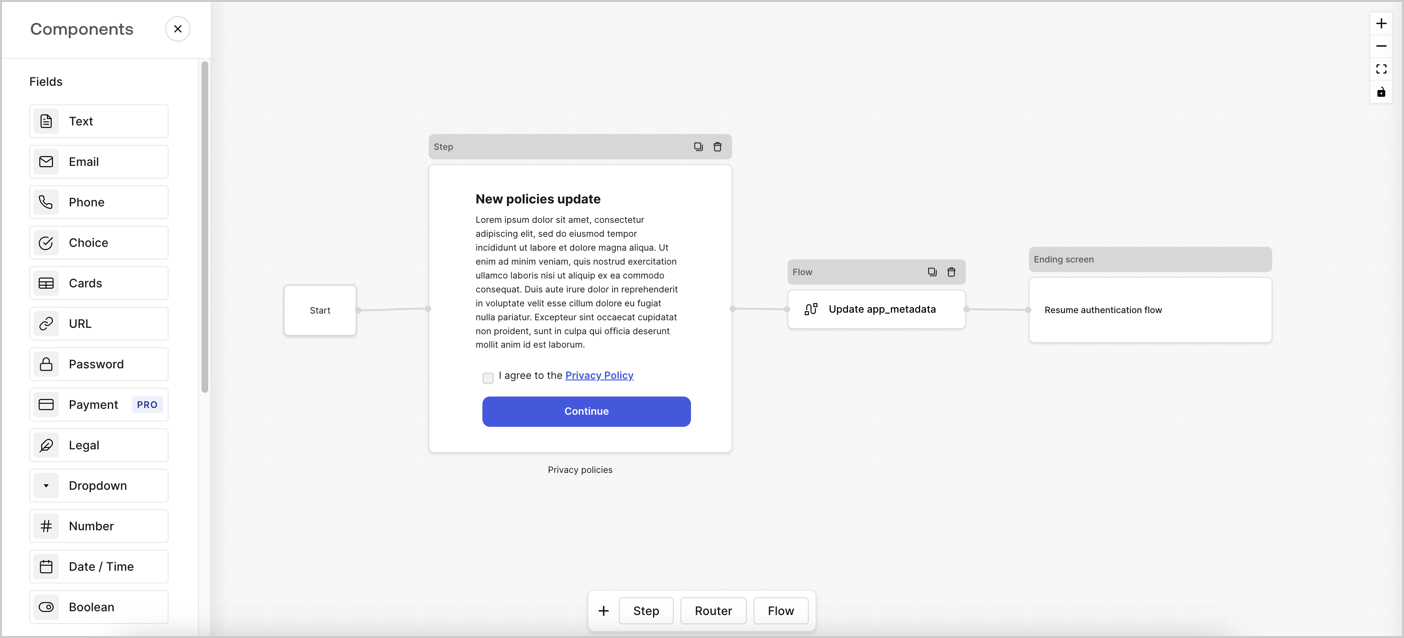
Forms for Actions allows you to create custom privacy policies flows and store the consent under the `app_metadata` object.
<Frame>
  <img src="https://mintcdn.com/docs-dev-fix-docs-5546-update-db-search/B55sdofHzfhiK2yn/docs/images/cdy7uua7fh8z/6i68dMvHDTijfRmSgN1x8Q/ad900e7d4c0fb34645921435472b8684/privavy-policy-form.png?fit=max&auto=format&n=B55sdofHzfhiK2yn&q=85&s=41be6fd0d7e8576c3d08f0e5c54d5ad9" alt="Dashboard > Actions > Forms > Privacy policy use case" data-og-width="1404" width="1404" data-og-height="638" height="638" data-path="docs/images/cdy7uua7fh8z/6i68dMvHDTijfRmSgN1x8Q/ad900e7d4c0fb34645921435472b8684/privavy-policy-form.png" data-optimize="true" data-opv="3" srcset="https://mintcdn.com/docs-dev-fix-docs-5546-update-db-search/B55sdofHzfhiK2yn/docs/images/cdy7uua7fh8z/6i68dMvHDTijfRmSgN1x8Q/ad900e7d4c0fb34645921435472b8684/privavy-policy-form.png?w=280&fit=max&auto=format&n=B55sdofHzfhiK2yn&q=85&s=13706c2f0ed28bb96c484817ca4a3a87 280w, https://mintcdn.com/docs-dev-fix-docs-5546-update-db-search/B55sdofHzfhiK2yn/docs/images/cdy7uua7fh8z/6i68dMvHDTijfRmSgN1x8Q/ad900e7d4c0fb34645921435472b8684/privavy-policy-form.png?w=560&fit=max&auto=format&n=B55sdofHzfhiK2yn&q=85&s=2b405e59b1f3ba8727d2d38d363cfd4c 560w, https://mintcdn.com/docs-dev-fix-docs-5546-update-db-search/B55sdofHzfhiK2yn/docs/images/cdy7uua7fh8z/6i68dMvHDTijfRmSgN1x8Q/ad900e7d4c0fb34645921435472b8684/privavy-policy-form.png?w=840&fit=max&auto=format&n=B55sdofHzfhiK2yn&q=85&s=70b52075412ed9a8533580d825c7dedf 840w, https://mintcdn.com/docs-dev-fix-docs-5546-update-db-search/B55sdofHzfhiK2yn/docs/images/cdy7uua7fh8z/6i68dMvHDTijfRmSgN1x8Q/ad900e7d4c0fb34645921435472b8684/privavy-policy-form.png?w=1100&fit=max&auto=format&n=B55sdofHzfhiK2yn&q=85&s=7e329f2364f2003ab4505aba6ef753ae 1100w, https://mintcdn.com/docs-dev-fix-docs-5546-update-db-search/B55sdofHzfhiK2yn/docs/images/cdy7uua7fh8z/6i68dMvHDTijfRmSgN1x8Q/ad900e7d4c0fb34645921435472b8684/privavy-policy-form.png?w=1650&fit=max&auto=format&n=B55sdofHzfhiK2yn&q=85&s=7d28e280ba0a5b8302e7eff0e973d444 1650w, https://mintcdn.com/docs-dev-fix-docs-5546-update-db-search/B55sdofHzfhiK2yn/docs/images/cdy7uua7fh8z/6i68dMvHDTijfRmSgN1x8Q/ad900e7d4c0fb34645921435472b8684/privavy-policy-form.png?w=2500&fit=max&auto=format&n=B55sdofHzfhiK2yn&q=85&s=7f9dac1258085f6ca39f6d34fa541309 2500w" />
</Frame>

The sections below outline how you can create an Update Policy form using nodes and flows, along with steps for adding your form to a [Post Login](/docs/customize/actions/explore-triggers/signup-and-login-triggers/login-trigger) Action.

## Create a form from scratch

Follow these steps to create a form to gather information:

1. Open the Form editor by selecting **Auth0 Dashboard > Actions > Forms.**
2. Select **Create Form** > **Start from scratch**.

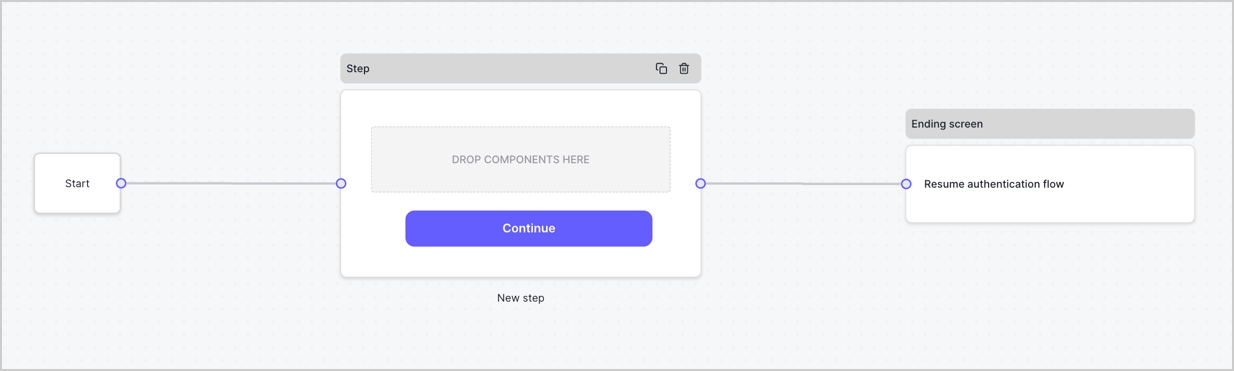
By default, a new form contains a Start node, a Step node, and an Ending screen node.
<Frame>
  <img src="https://mintcdn.com/docs-dev-fix-docs-5546-update-db-search/NmLl6Pmp2OlcD5Hd/docs/images/cdy7uua7fh8z/2TZ9jSjgEcARFpULI6hz4R/a4319a1bd482f2ee5cc23100fdb2f42c/New-form-Forms-for-action-use-case.png?fit=max&auto=format&n=NmLl6Pmp2OlcD5Hd&q=85&s=23542c4879ec5fa2e21aa86b1ae5a6f8" alt="Dashboard > Forms > Use Cases > Form" data-og-width="1234" width="1234" data-og-height="371" height="371" data-path="docs/images/cdy7uua7fh8z/2TZ9jSjgEcARFpULI6hz4R/a4319a1bd482f2ee5cc23100fdb2f42c/New-form-Forms-for-action-use-case.png" data-optimize="true" data-opv="3" srcset="https://mintcdn.com/docs-dev-fix-docs-5546-update-db-search/NmLl6Pmp2OlcD5Hd/docs/images/cdy7uua7fh8z/2TZ9jSjgEcARFpULI6hz4R/a4319a1bd482f2ee5cc23100fdb2f42c/New-form-Forms-for-action-use-case.png?w=280&fit=max&auto=format&n=NmLl6Pmp2OlcD5Hd&q=85&s=7b9061daa6d3a88ac56161cb93350e42 280w, https://mintcdn.com/docs-dev-fix-docs-5546-update-db-search/NmLl6Pmp2OlcD5Hd/docs/images/cdy7uua7fh8z/2TZ9jSjgEcARFpULI6hz4R/a4319a1bd482f2ee5cc23100fdb2f42c/New-form-Forms-for-action-use-case.png?w=560&fit=max&auto=format&n=NmLl6Pmp2OlcD5Hd&q=85&s=132051eb9b63a2eb29b19e4c4ae0b420 560w, https://mintcdn.com/docs-dev-fix-docs-5546-update-db-search/NmLl6Pmp2OlcD5Hd/docs/images/cdy7uua7fh8z/2TZ9jSjgEcARFpULI6hz4R/a4319a1bd482f2ee5cc23100fdb2f42c/New-form-Forms-for-action-use-case.png?w=840&fit=max&auto=format&n=NmLl6Pmp2OlcD5Hd&q=85&s=5f575a6cc4671f1ff2d8786d130883f0 840w, https://mintcdn.com/docs-dev-fix-docs-5546-update-db-search/NmLl6Pmp2OlcD5Hd/docs/images/cdy7uua7fh8z/2TZ9jSjgEcARFpULI6hz4R/a4319a1bd482f2ee5cc23100fdb2f42c/New-form-Forms-for-action-use-case.png?w=1100&fit=max&auto=format&n=NmLl6Pmp2OlcD5Hd&q=85&s=83a6240369e68b26696222115fb0a243 1100w, https://mintcdn.com/docs-dev-fix-docs-5546-update-db-search/NmLl6Pmp2OlcD5Hd/docs/images/cdy7uua7fh8z/2TZ9jSjgEcARFpULI6hz4R/a4319a1bd482f2ee5cc23100fdb2f42c/New-form-Forms-for-action-use-case.png?w=1650&fit=max&auto=format&n=NmLl6Pmp2OlcD5Hd&q=85&s=523d19ccfb674cc87af0fe093c04d87d 1650w, https://mintcdn.com/docs-dev-fix-docs-5546-update-db-search/NmLl6Pmp2OlcD5Hd/docs/images/cdy7uua7fh8z/2TZ9jSjgEcARFpULI6hz4R/a4319a1bd482f2ee5cc23100fdb2f42c/New-form-Forms-for-action-use-case.png?w=2500&fit=max&auto=format&n=NmLl6Pmp2OlcD5Hd&q=85&s=8b69eb53b6605d6751c227802731e8e7 2500w" />
</Frame>

### Configure the Step node

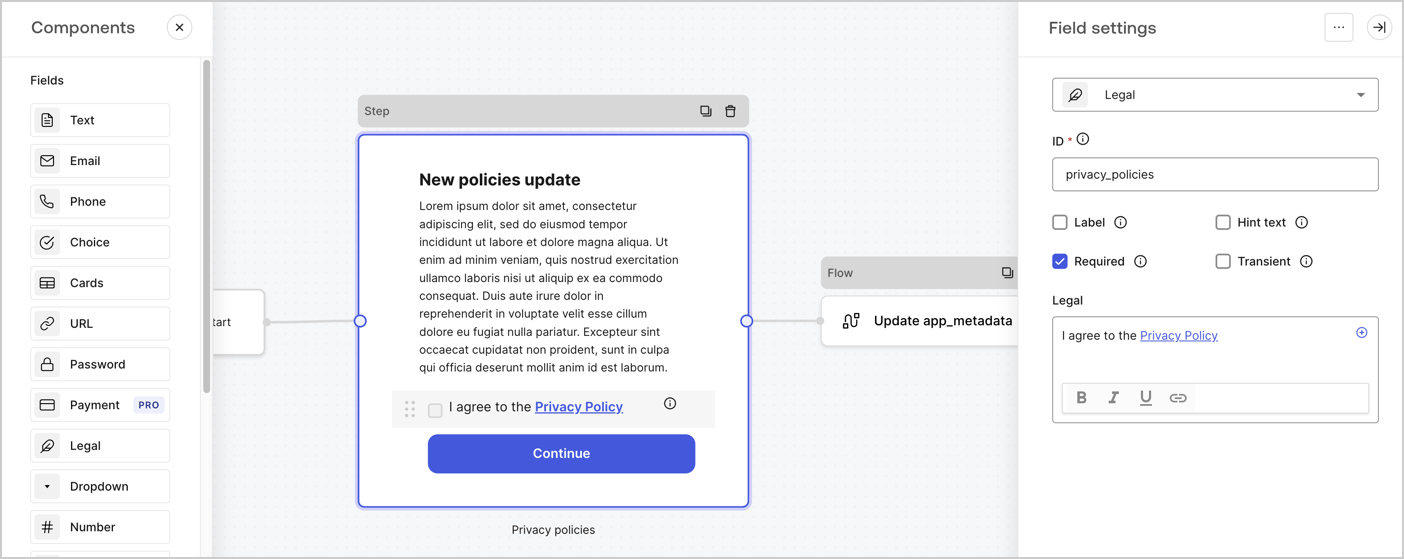
The Step node is the graphical interface visible to users. Add [Fields](/docs/customize/forms/nodes-and-components) to the Step node to collect the new agreement acceptance value by following these steps:

1. Drag a **Rich text** field from the **Components menu** into the **Step** node.

   * **Rich text**: Enter a description of your privacy policies updates.
   * Select **Save**.
2. Drag a **Legal** field into the **Step** node.

   * **ID**: Enter `privacy_policies`.
   * **Required**: Enable the checkbox.
   * **Legal**: Enter `I agree to the Privacy Policy`.
   * Select **Save**.
3. Select **Publish** to save.
<Frame>
  <img src="https://mintcdn.com/docs-dev-fix-docs-5546-update-db-search/67sfVHkxEzvbg1jW/docs/images/cdy7uua7fh8z/59zFFjQjAnjogkc2QGIqqJ/0ad66b1b636544122aa4e65968b76c2c/privacy-policy-step-node.png?fit=max&auto=format&n=67sfVHkxEzvbg1jW&q=85&s=f2b5fc144d9f56d77e3bd496e61b3343" alt="Dashboard > Actions > Forms > Use case privacy policy step node" data-og-width="1404" width="1404" data-og-height="559" height="559" data-path="docs/images/cdy7uua7fh8z/59zFFjQjAnjogkc2QGIqqJ/0ad66b1b636544122aa4e65968b76c2c/privacy-policy-step-node.png" data-optimize="true" data-opv="3" srcset="https://mintcdn.com/docs-dev-fix-docs-5546-update-db-search/67sfVHkxEzvbg1jW/docs/images/cdy7uua7fh8z/59zFFjQjAnjogkc2QGIqqJ/0ad66b1b636544122aa4e65968b76c2c/privacy-policy-step-node.png?w=280&fit=max&auto=format&n=67sfVHkxEzvbg1jW&q=85&s=e692bdc4a9795794f5d538e6c426dd78 280w, https://mintcdn.com/docs-dev-fix-docs-5546-update-db-search/67sfVHkxEzvbg1jW/docs/images/cdy7uua7fh8z/59zFFjQjAnjogkc2QGIqqJ/0ad66b1b636544122aa4e65968b76c2c/privacy-policy-step-node.png?w=560&fit=max&auto=format&n=67sfVHkxEzvbg1jW&q=85&s=e783b40293f9db6d02fc0ca1f060978b 560w, https://mintcdn.com/docs-dev-fix-docs-5546-update-db-search/67sfVHkxEzvbg1jW/docs/images/cdy7uua7fh8z/59zFFjQjAnjogkc2QGIqqJ/0ad66b1b636544122aa4e65968b76c2c/privacy-policy-step-node.png?w=840&fit=max&auto=format&n=67sfVHkxEzvbg1jW&q=85&s=caee8edb8bb8f1fed2759a64c606cfb8 840w, https://mintcdn.com/docs-dev-fix-docs-5546-update-db-search/67sfVHkxEzvbg1jW/docs/images/cdy7uua7fh8z/59zFFjQjAnjogkc2QGIqqJ/0ad66b1b636544122aa4e65968b76c2c/privacy-policy-step-node.png?w=1100&fit=max&auto=format&n=67sfVHkxEzvbg1jW&q=85&s=123a3d44c09af8e610d7c1cd4c1326a2 1100w, https://mintcdn.com/docs-dev-fix-docs-5546-update-db-search/67sfVHkxEzvbg1jW/docs/images/cdy7uua7fh8z/59zFFjQjAnjogkc2QGIqqJ/0ad66b1b636544122aa4e65968b76c2c/privacy-policy-step-node.png?w=1650&fit=max&auto=format&n=67sfVHkxEzvbg1jW&q=85&s=8533acb36827bf0911eecac34ad555c4 1650w, https://mintcdn.com/docs-dev-fix-docs-5546-update-db-search/67sfVHkxEzvbg1jW/docs/images/cdy7uua7fh8z/59zFFjQjAnjogkc2QGIqqJ/0ad66b1b636544122aa4e65968b76c2c/privacy-policy-step-node.png?w=2500&fit=max&auto=format&n=67sfVHkxEzvbg1jW&q=85&s=4a1169252390229381652ded984749ac 2500w" />
</Frame>

### Configure the Flow node

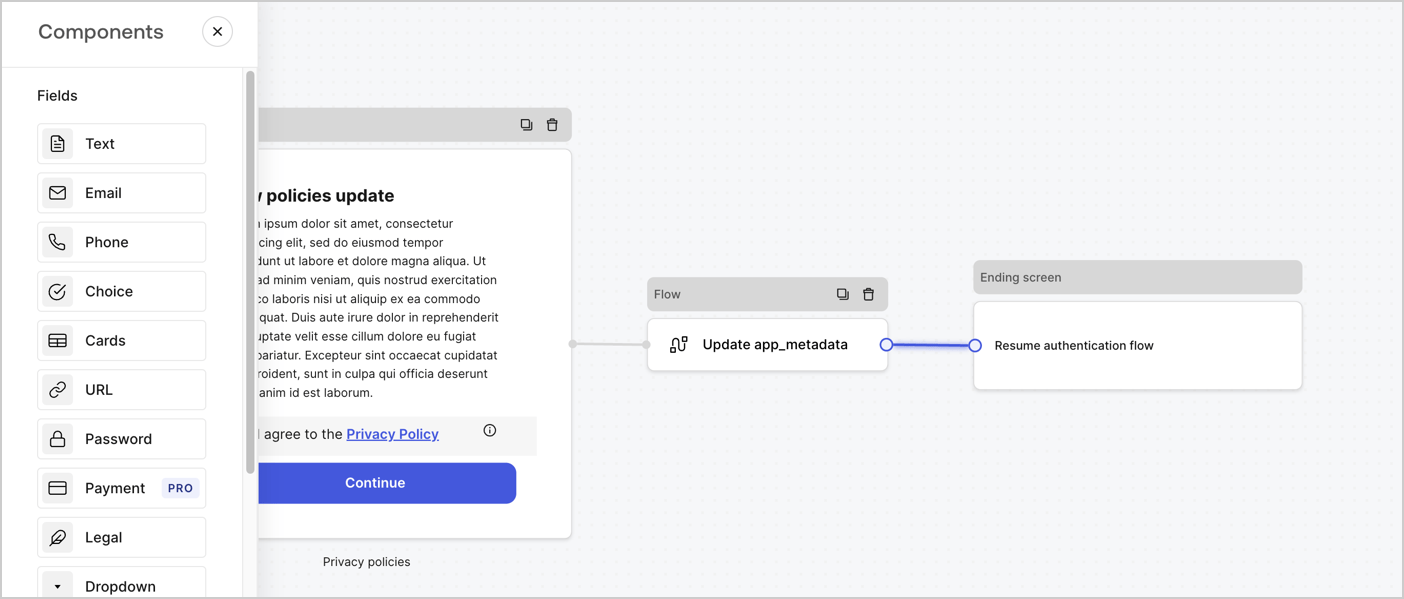
Add a **Flow** node after the **Step** node to update the `app_metadata` and resume the authentication flow by following these steps:

1. Select **Flow** from the bottom of the Form editor.
2. Remove the existing link between the **Step** and **Ending Screen** nodes.
3. Select the new **Flow** > **Click to add a flow** > **Create a new flow.**

   * Enter `Update app_metadata` in the **Name** field.
   * Select **Create**.
   * Select **Save**.
4. Link the **Flow** node to the **Step** and **Ending Screen** nodes as pictured below.
5. Select **Publish** to save.
<Frame>
  <img src="https://mintcdn.com/docs-dev-fix-docs-5546-update-db-search/B55sdofHzfhiK2yn/docs/images/cdy7uua7fh8z/6YIkzm7SrpM9LW76AXuRzh/353c518fe82bbaa440836da1d83596d6/link-policies.png?fit=max&auto=format&n=B55sdofHzfhiK2yn&q=85&s=4621d591d0044985ba1377731a61bac8" alt="Dashboard > Actions > Forms > Form" data-og-width="1404" width="1404" data-og-height="599" height="599" data-path="docs/images/cdy7uua7fh8z/6YIkzm7SrpM9LW76AXuRzh/353c518fe82bbaa440836da1d83596d6/link-policies.png" data-optimize="true" data-opv="3" srcset="https://mintcdn.com/docs-dev-fix-docs-5546-update-db-search/B55sdofHzfhiK2yn/docs/images/cdy7uua7fh8z/6YIkzm7SrpM9LW76AXuRzh/353c518fe82bbaa440836da1d83596d6/link-policies.png?w=280&fit=max&auto=format&n=B55sdofHzfhiK2yn&q=85&s=7bcf4c6063c795f06872362e953d3b06 280w, https://mintcdn.com/docs-dev-fix-docs-5546-update-db-search/B55sdofHzfhiK2yn/docs/images/cdy7uua7fh8z/6YIkzm7SrpM9LW76AXuRzh/353c518fe82bbaa440836da1d83596d6/link-policies.png?w=560&fit=max&auto=format&n=B55sdofHzfhiK2yn&q=85&s=e34d16e73546bc2d3195d57c9489bc2c 560w, https://mintcdn.com/docs-dev-fix-docs-5546-update-db-search/B55sdofHzfhiK2yn/docs/images/cdy7uua7fh8z/6YIkzm7SrpM9LW76AXuRzh/353c518fe82bbaa440836da1d83596d6/link-policies.png?w=840&fit=max&auto=format&n=B55sdofHzfhiK2yn&q=85&s=2332eaa07af72e3a5d9579047f9fe89f 840w, https://mintcdn.com/docs-dev-fix-docs-5546-update-db-search/B55sdofHzfhiK2yn/docs/images/cdy7uua7fh8z/6YIkzm7SrpM9LW76AXuRzh/353c518fe82bbaa440836da1d83596d6/link-policies.png?w=1100&fit=max&auto=format&n=B55sdofHzfhiK2yn&q=85&s=60fec17d989780fc3ba0492a5acd5a46 1100w, https://mintcdn.com/docs-dev-fix-docs-5546-update-db-search/B55sdofHzfhiK2yn/docs/images/cdy7uua7fh8z/6YIkzm7SrpM9LW76AXuRzh/353c518fe82bbaa440836da1d83596d6/link-policies.png?w=1650&fit=max&auto=format&n=B55sdofHzfhiK2yn&q=85&s=989079b7491dceacc3b24b0d129f5fc6 1650w, https://mintcdn.com/docs-dev-fix-docs-5546-update-db-search/B55sdofHzfhiK2yn/docs/images/cdy7uua7fh8z/6YIkzm7SrpM9LW76AXuRzh/353c518fe82bbaa440836da1d83596d6/link-policies.png?w=2500&fit=max&auto=format&n=B55sdofHzfhiK2yn&q=85&s=1f80ed81a2cc43a0259d6e551c180184 2500w" />
</Frame>

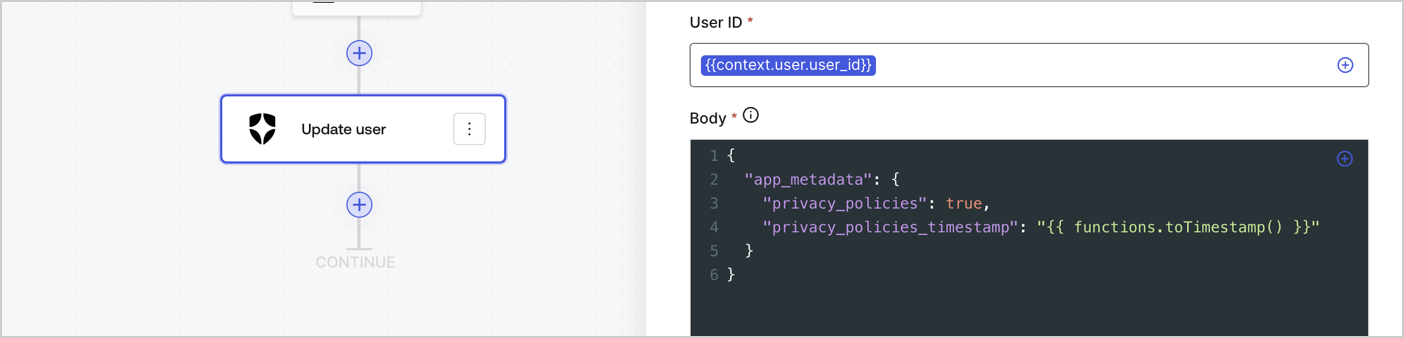
Add an Auth0 Update user action to the flow by following these steps:

1. Select the **Flow** **Update app\_metadata** > **Edit flow** to open the Flow editor in a new tab.
2. Below the StartAction, select the **+** icon to add an **Update user** action. Complete the fields below, then select **Save** to continue.

   * **Connection**: Select from the dropdown the Vault connection to your M2M application.

   * **User ID**: Enter `{{context.user.user_id}}`.

   * **Body**: Copy and paste the following code to update the app\_metadata with the privacy\_policies and privacy\_policies\_timestamp properties.

     ```text lines theme={null}
     {
       "app_metadata": {
         "privacy_policies": true,
         "privacy_policies_timestamp": "{{ functions.toTimestamp() }}"
       }
     }
     ```

   * Select **Save**.
3. Select **Publish** to save.
<Frame>
  <img src="https://mintcdn.com/docs-dev-fix-docs-5546-update-db-search/2L6O57GNOE0N2W5c/docs/images/cdy7uua7fh8z/CvMNIwWrOUwaFW4X3G28p/1fb70ae57a20749d9ffaaba8dc0b7e26/update-user-privacy.png?fit=max&auto=format&n=2L6O57GNOE0N2W5c&q=85&s=145222e350546fc8127e671f20d0bc52" alt="Dashboard > Actions > Forms > User case privacy policy code" data-og-width="1404" width="1404" data-og-height="338" height="338" data-path="docs/images/cdy7uua7fh8z/CvMNIwWrOUwaFW4X3G28p/1fb70ae57a20749d9ffaaba8dc0b7e26/update-user-privacy.png" data-optimize="true" data-opv="3" srcset="https://mintcdn.com/docs-dev-fix-docs-5546-update-db-search/2L6O57GNOE0N2W5c/docs/images/cdy7uua7fh8z/CvMNIwWrOUwaFW4X3G28p/1fb70ae57a20749d9ffaaba8dc0b7e26/update-user-privacy.png?w=280&fit=max&auto=format&n=2L6O57GNOE0N2W5c&q=85&s=4c4dd229bf30a7554edfb6663b7c1902 280w, https://mintcdn.com/docs-dev-fix-docs-5546-update-db-search/2L6O57GNOE0N2W5c/docs/images/cdy7uua7fh8z/CvMNIwWrOUwaFW4X3G28p/1fb70ae57a20749d9ffaaba8dc0b7e26/update-user-privacy.png?w=560&fit=max&auto=format&n=2L6O57GNOE0N2W5c&q=85&s=52796e6fd616f262cb355998c66c87fe 560w, https://mintcdn.com/docs-dev-fix-docs-5546-update-db-search/2L6O57GNOE0N2W5c/docs/images/cdy7uua7fh8z/CvMNIwWrOUwaFW4X3G28p/1fb70ae57a20749d9ffaaba8dc0b7e26/update-user-privacy.png?w=840&fit=max&auto=format&n=2L6O57GNOE0N2W5c&q=85&s=7e3db39ea093e6716d8ebc6e99a96ab7 840w, https://mintcdn.com/docs-dev-fix-docs-5546-update-db-search/2L6O57GNOE0N2W5c/docs/images/cdy7uua7fh8z/CvMNIwWrOUwaFW4X3G28p/1fb70ae57a20749d9ffaaba8dc0b7e26/update-user-privacy.png?w=1100&fit=max&auto=format&n=2L6O57GNOE0N2W5c&q=85&s=c59ce2057c0c7cce7dccad640e6e902e 1100w, https://mintcdn.com/docs-dev-fix-docs-5546-update-db-search/2L6O57GNOE0N2W5c/docs/images/cdy7uua7fh8z/CvMNIwWrOUwaFW4X3G28p/1fb70ae57a20749d9ffaaba8dc0b7e26/update-user-privacy.png?w=1650&fit=max&auto=format&n=2L6O57GNOE0N2W5c&q=85&s=83f7f087600b79ff039140ba553208a0 1650w, https://mintcdn.com/docs-dev-fix-docs-5546-update-db-search/2L6O57GNOE0N2W5c/docs/images/cdy7uua7fh8z/CvMNIwWrOUwaFW4X3G28p/1fb70ae57a20749d9ffaaba8dc0b7e26/update-user-privacy.png?w=2500&fit=max&auto=format&n=2L6O57GNOE0N2W5c&q=85&s=528bcb9cea63f09d2609f4fb0c085018 2500w" />
</Frame>

<Callout icon="file-lines" color="#0EA5E9" iconType="regular">
  The flow **Update app\_metadata** adds a `privacy_policies true` value to the app`_metadata` object and also generates a timestamp with a [helper function.](/docs/customize/forms/variables)
</Callout>

## Retrieve the form render code

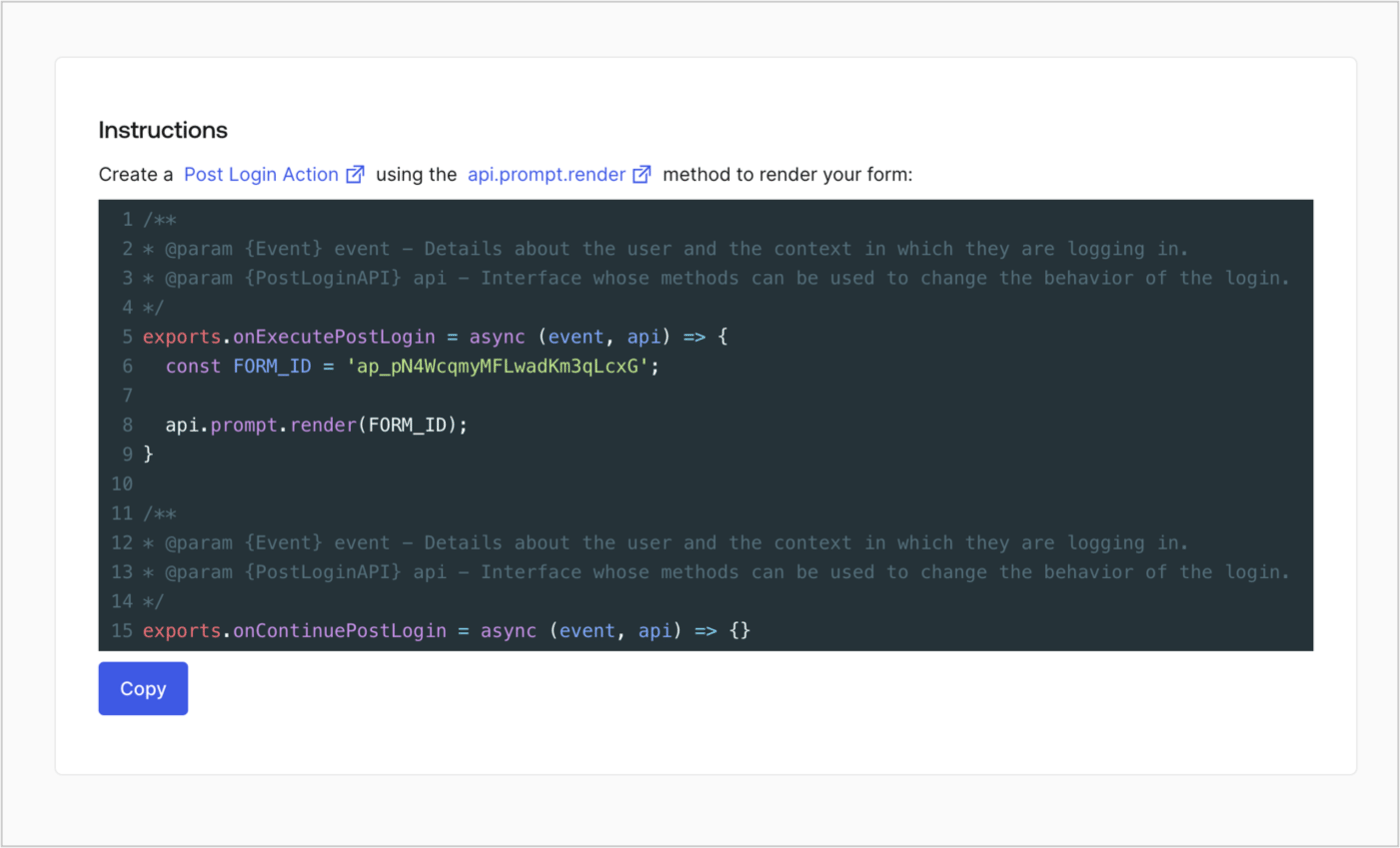
Retrieve your form render code to visually render the form with a custom Post Login Action by following these steps:

* From the Form editor, select **`<> Render`**.
* Select **Copy**.
<Frame>
  <img src="https://mintcdn.com/docs-dev-fix-docs-5546-update-db-search/OG3hPcpGGfB2DCLh/docs/images/cdy7uua7fh8z/2EIUzc539sq9lwoTKbjoJv/496a864c0fc44a782c9cadca119dbfb0/embed.png?fit=max&auto=format&n=OG3hPcpGGfB2DCLh&q=85&s=af280b596287704b01962bbdeeb6b21b" alt="Dashboard > Actions > Forms > Form > Embed" data-og-width="1400" width="1400" data-og-height="848" height="848" data-path="docs/images/cdy7uua7fh8z/2EIUzc539sq9lwoTKbjoJv/496a864c0fc44a782c9cadca119dbfb0/embed.png" data-optimize="true" data-opv="3" srcset="https://mintcdn.com/docs-dev-fix-docs-5546-update-db-search/OG3hPcpGGfB2DCLh/docs/images/cdy7uua7fh8z/2EIUzc539sq9lwoTKbjoJv/496a864c0fc44a782c9cadca119dbfb0/embed.png?w=280&fit=max&auto=format&n=OG3hPcpGGfB2DCLh&q=85&s=9e335512a5a93e763a4fdac725c7de19 280w, https://mintcdn.com/docs-dev-fix-docs-5546-update-db-search/OG3hPcpGGfB2DCLh/docs/images/cdy7uua7fh8z/2EIUzc539sq9lwoTKbjoJv/496a864c0fc44a782c9cadca119dbfb0/embed.png?w=560&fit=max&auto=format&n=OG3hPcpGGfB2DCLh&q=85&s=e79da6ff227c80f07dfd75f756baf023 560w, https://mintcdn.com/docs-dev-fix-docs-5546-update-db-search/OG3hPcpGGfB2DCLh/docs/images/cdy7uua7fh8z/2EIUzc539sq9lwoTKbjoJv/496a864c0fc44a782c9cadca119dbfb0/embed.png?w=840&fit=max&auto=format&n=OG3hPcpGGfB2DCLh&q=85&s=e519650ab000ce33dc2d74e710f99e4c 840w, https://mintcdn.com/docs-dev-fix-docs-5546-update-db-search/OG3hPcpGGfB2DCLh/docs/images/cdy7uua7fh8z/2EIUzc539sq9lwoTKbjoJv/496a864c0fc44a782c9cadca119dbfb0/embed.png?w=1100&fit=max&auto=format&n=OG3hPcpGGfB2DCLh&q=85&s=223518b60481846c11d022a83fd981de 1100w, https://mintcdn.com/docs-dev-fix-docs-5546-update-db-search/OG3hPcpGGfB2DCLh/docs/images/cdy7uua7fh8z/2EIUzc539sq9lwoTKbjoJv/496a864c0fc44a782c9cadca119dbfb0/embed.png?w=1650&fit=max&auto=format&n=OG3hPcpGGfB2DCLh&q=85&s=4bb1c086de0d215f365c6daaafa39418 1650w, https://mintcdn.com/docs-dev-fix-docs-5546-update-db-search/OG3hPcpGGfB2DCLh/docs/images/cdy7uua7fh8z/2EIUzc539sq9lwoTKbjoJv/496a864c0fc44a782c9cadca119dbfb0/embed.png?w=2500&fit=max&auto=format&n=OG3hPcpGGfB2DCLh&q=85&s=c84ccfe5fd948d3c3ea9d7f0114eb18d 2500w" />
</Frame>

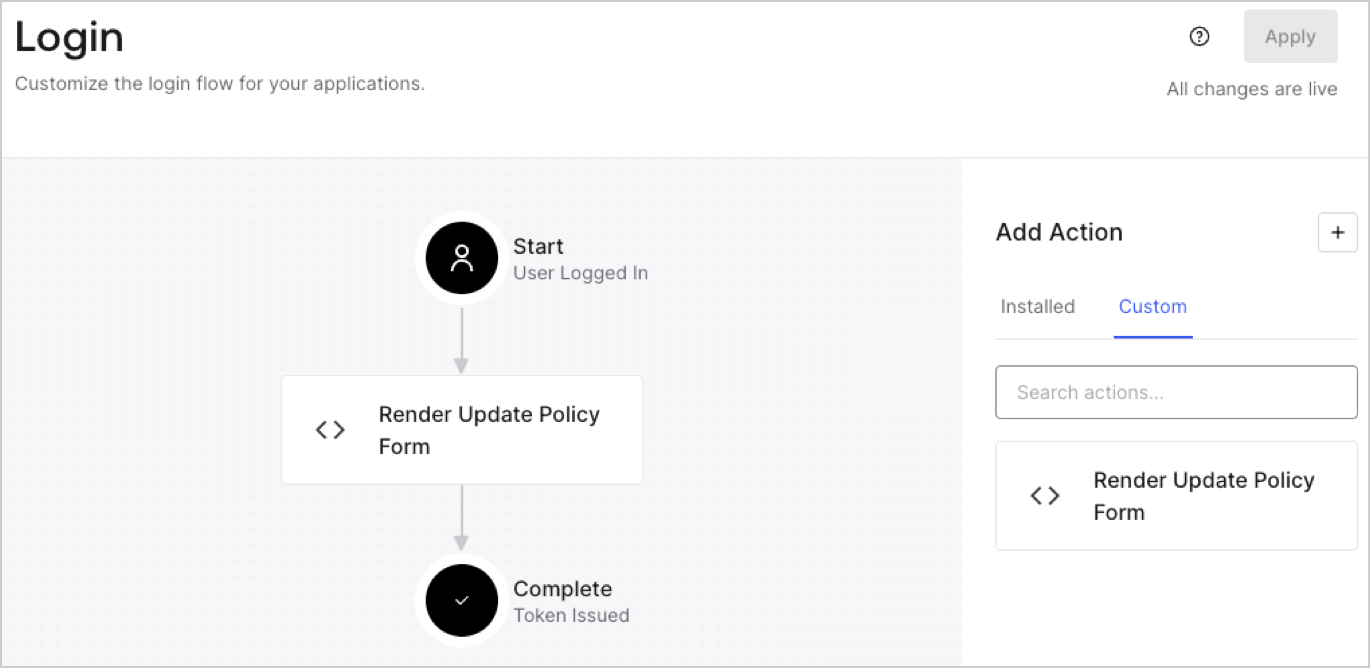
## Create a Post Login Action

Create a post-login Action to render your form by following these steps:

1. Navigate to **Auth0 Dashboard > Actions > Flows > Login.**
2. Select the **+** icon and Select **Build from scratch**:

   * **Name**: Enter `Render Update Policy Form`.
   * **Trigger**: Select `Login / Post Login`.
   * **Runtime**: Select the recommended version.
3. Select **Create**.

To configure the post-login Action:

1. Delete the existing code from the Code editor.
2. Paste the form render code into the Code editor.
3. Edit the code to define the conditional logic that will render the form.

   ```javascript lines theme={null}
   /**
   * @param {Event} event - Details about the user and the context in which they are logging in.
   * @param {PostLoginAPI} api - Interface whose methods can be used to change the behavior of the login.
   */
   exports.onExecutePostLogin = async (event, api) => {
     const FORM_ID = 'REPLACE_WITH_YOUR_FORM_ID';

     if (event.user.app_metadata.privacy_policies !== true) {
       api.prompt.render(FORM_ID);
     }
   }

   exports.onContinuePostLogin = async (event, api) => { }
   ```

   <Callout icon="file-lines" color="#0EA5E9" iconType="regular">
     The example code above will render the form when a user is missing the app metadata `privacy_policies` property.
   </Callout>
4. Select **Deploy.**
5. Drag and Drop the **Render Update Policy Form** Action to the **Login** flow.
   <Frame>
     <img src="https://mintcdn.com/docs-dev-fix-docs-5546-update-db-search/Gl46ucE3KSCOEB9O/docs/images/cdy7uua7fh8z/5TOwDgevZsBqd7yZynUYWU/41ca909dc3007aed4f40ff794a05efa5/postlogin.png?fit=max&auto=format&n=Gl46ucE3KSCOEB9O&q=85&s=f71f3c6202311e6f822103e0a2f03514" alt="Dashboard > Forms > Use Case > Render update policy form login action" data-og-width="1370" width="1370" data-og-height="668" height="668" data-path="docs/images/cdy7uua7fh8z/5TOwDgevZsBqd7yZynUYWU/41ca909dc3007aed4f40ff794a05efa5/postlogin.png" data-optimize="true" data-opv="3" srcset="https://mintcdn.com/docs-dev-fix-docs-5546-update-db-search/Gl46ucE3KSCOEB9O/docs/images/cdy7uua7fh8z/5TOwDgevZsBqd7yZynUYWU/41ca909dc3007aed4f40ff794a05efa5/postlogin.png?w=280&fit=max&auto=format&n=Gl46ucE3KSCOEB9O&q=85&s=eec4f63b01656a79821638d0e3304ea9 280w, https://mintcdn.com/docs-dev-fix-docs-5546-update-db-search/Gl46ucE3KSCOEB9O/docs/images/cdy7uua7fh8z/5TOwDgevZsBqd7yZynUYWU/41ca909dc3007aed4f40ff794a05efa5/postlogin.png?w=560&fit=max&auto=format&n=Gl46ucE3KSCOEB9O&q=85&s=33588d2c65989630dc4737b2513465cc 560w, https://mintcdn.com/docs-dev-fix-docs-5546-update-db-search/Gl46ucE3KSCOEB9O/docs/images/cdy7uua7fh8z/5TOwDgevZsBqd7yZynUYWU/41ca909dc3007aed4f40ff794a05efa5/postlogin.png?w=840&fit=max&auto=format&n=Gl46ucE3KSCOEB9O&q=85&s=39a1a587b2b1d51b3f578171086481f8 840w, https://mintcdn.com/docs-dev-fix-docs-5546-update-db-search/Gl46ucE3KSCOEB9O/docs/images/cdy7uua7fh8z/5TOwDgevZsBqd7yZynUYWU/41ca909dc3007aed4f40ff794a05efa5/postlogin.png?w=1100&fit=max&auto=format&n=Gl46ucE3KSCOEB9O&q=85&s=d995f23624f0475c827917a3641d193e 1100w, https://mintcdn.com/docs-dev-fix-docs-5546-update-db-search/Gl46ucE3KSCOEB9O/docs/images/cdy7uua7fh8z/5TOwDgevZsBqd7yZynUYWU/41ca909dc3007aed4f40ff794a05efa5/postlogin.png?w=1650&fit=max&auto=format&n=Gl46ucE3KSCOEB9O&q=85&s=1f7b074ecd95be6009c3bf193f1e3ebf 1650w, https://mintcdn.com/docs-dev-fix-docs-5546-update-db-search/Gl46ucE3KSCOEB9O/docs/images/cdy7uua7fh8z/5TOwDgevZsBqd7yZynUYWU/41ca909dc3007aed4f40ff794a05efa5/postlogin.png?w=2500&fit=max&auto=format&n=Gl46ucE3KSCOEB9O&q=85&s=fb31ec00df6bdbddeaa932e8f2c2cca7 2500w" />
   </Frame>
6. Select **Apply.**

### Test implementation

Test the implementation by following these steps:

1. Log in with an existing user whose app`_metadata` attribute `privacy_policies` does not have a value.
2. The post-login Action in the Login flow will render the form and prompt for acceptance.
3. Select **Auth0 Dashboard > User Management > Users,** locate the user and verify that the `app_metadata` attribute `privacy_policies` contains a `true` value and a timestamp.
